Firebase Studio is shutting down: where your app can go
By Andrea Buttarelli, founder of Feega · checked 2026-11-18 · how we checked
Firebase Studio stops on 22 March 2027, and new workspaces closed on 22 June 2026. Google points to AI Studio and Antigravity. Feega is not a Firebase replacement; it appears in one row only, as a way to keep editing the UI.
the routes at a glance
| Route | Best for | Watch out for |
|---|---|---|
| AI Studio Build | Prompt-built apps with Firestore and Auth set up | Hosting is Cloud Run |
| Antigravity | Code-heavy projects, with history, files and secrets carried over | A new IDE |
| Your own repo | Anyone who wants no new lock-in | You choose the backend and hosting yourself |
export while the workspace still opens
The first move is to get a copy of your code out. Waiting for March leaves you hurrying, and a hurried move tends to be the one that loses something.
Once the code is in a repo you control, every other decision becomes reversible.
- Keep working in Firebase Studio
- Notice the deadline
- Rush the export
- Export the code
- Put it in your repo
- Pick a destination
- Keep editing
pick the destination for next year
Moving twice costs more than moving once. Choose by where the code should live in a year: on Google Cloud with Google’s tools, or in a repo you own with a backend you choose.
Google’s routes are reasonable if you want to stay in its ecosystem.
  .cta {
-   padding: 12px 20px;
+   padding: 14px 24px;
    border-radius: 6px;
  }
where Feega fits after the move
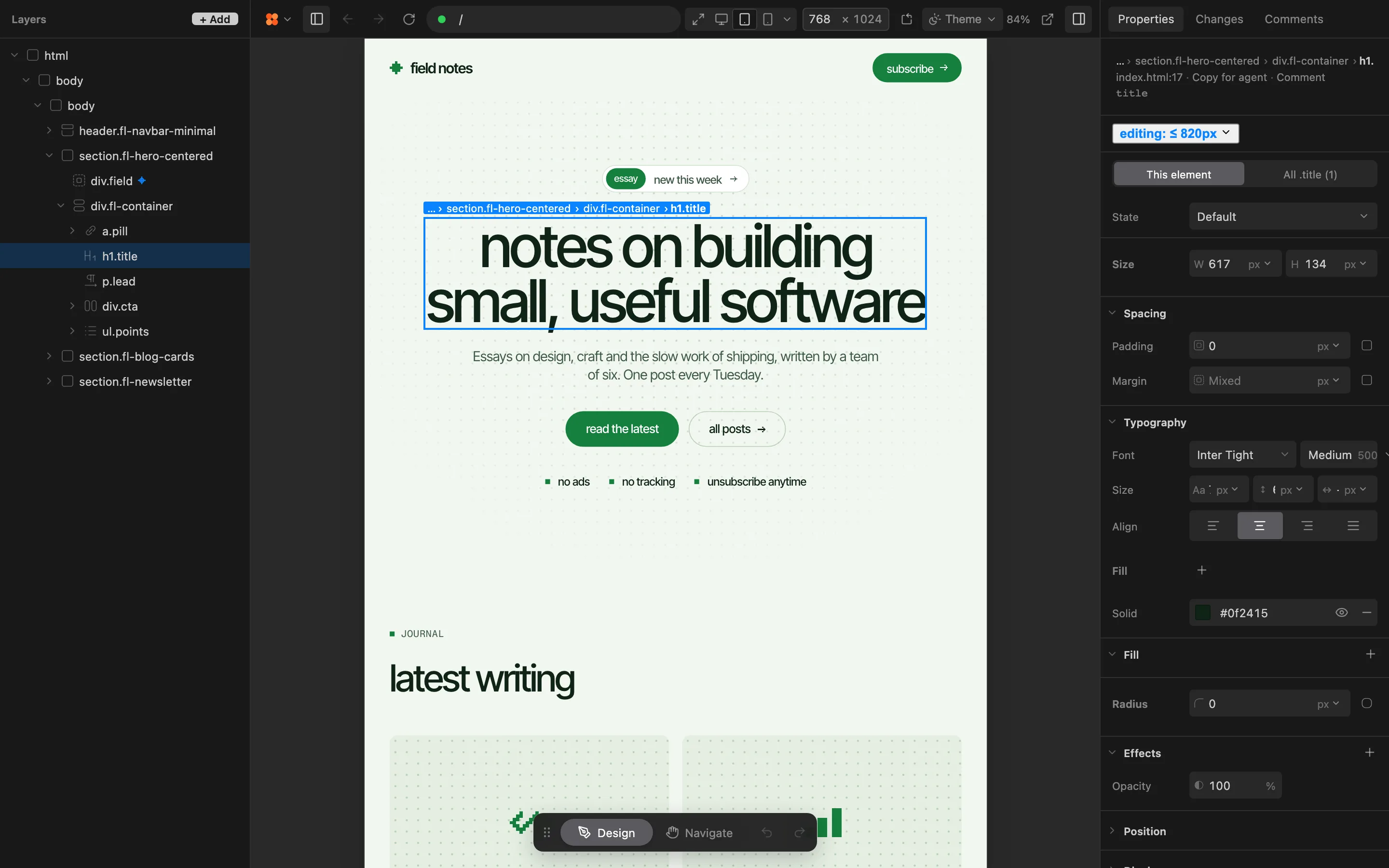
If you move to your own repo, Feega lets you keep changing the interface by clicking, in VS Code, Cursor, Windsurf or VSCodium. It edits CSS or Tailwind in SvelteKit, React, Next.js, Vue, Nuxt, React Router, Astro and Vite projects.
It is open source under Apache-2.0 and runs locally, so it adds no new lock-in.
when to choose which
choose a Google route if
- You built by prompting and want Firebase Auth and Firestore set up for you (AI Studio).
- You want an IDE with your history, files and secrets carried over (Antigravity).
- You plan to stay on Google Cloud.
choose Feega if
- You moved the code to your own repo.
- You want to keep editing the UI visually after the move.
- You do not want a new lock-in: it is open source and runs locally.
what it costs
Pricing for Google’s routes depends on your usage; read Google’s pages for current terms. The prices on this page are the ones each company published on the date shown, and they change. Check the source links at the bottom before you decide.
Feega is free and open source under Apache-2.0. It has no AI and no tokens, so a hand edit costs nothing to make.
three routes side by side
| AI Studio Build | Antigravity | Your own repo | |
|---|---|---|---|
| Recommended by Google for | Prompt-built apps | Code-heavy projects | Not listed |
| Backend | Firestore and Auth set up | Your choice | Your choice |
| Hosting | Cloud Run | Your choice | Your choice |
| Visual editing after | Annotations on the preview | No | Feega, Cursor Design Mode, Onlook |
keep editing the UI after you move, in five steps
- InstallAdd the Feega extension in VS Code, Cursor, Windsurf or VSCodium, or run npx feega in the project folder.
- Open the projectFeega starts your dev server and shows the running page next to your layers.
- Click and changePick an element, then set its padding, colour, type or layout in the Properties bar.
- Read the diffEvery edit appears in Changes as a diff against your source. Keep it, or undo it.
- Commit as usualFeega writes files and stops there. Review and commit with the tools you already use.
mistakes people make
Waiting for March. Export while the workspace still opens.
Moving twice. Pick the destination by where the code should live in a year.
questions
When does Firebase Studio shut down?
22 March 2027, according to Google’s migration page.
Can I still create a workspace?
No, not since 22 June 2026.
Does Feega replace Firebase?
No. It does not host or provide a backend. It edits the front end of a project.
Can I still create a Firebase Studio workspace?
No, not since 22 June 2026.
Where does Google send people?
To AI Studio and Antigravity, per its migration page.
how we checked
We make Feega, so read our column with that in mind. We read each product's public pages on 2026-11-18 and compared what they offer, not finished work. Something wrong? Write to hi@feega.app.
Feega is not affiliated with, endorsed by, sponsored by or connected to any company or product named on this page. All product names, logos and trademarks belong to their respective owners and are used only to identify those products. Information comes from their public pages on the date shown and may have changed since; check the source before you decide. This page is not legal, financial or purchasing advice.
Move the code first. Then pick the tool that fits where it lives.
download for free →