AI site builders, or the site you already have?
By Andrea Buttarelli, founder of Feega · checked 2026-11-18 · how we checked
Start from a prompt if you have nothing. Start from your repo if you do. v0, Lovable, Google AI Studio and Framer build something new and host it. Feega edits the site you already ship.
who each is for
| Tool | Best for | Watch out for |
|---|---|---|
| v0 | Chatting on Vercel; it imports a GitHub repo | Free allows 7 messages a day |
| Lovable | A hosted full-stack app from a prompt | GitHub sync creates a new repository |
| Google AI Studio Build | A new app with Firebase set up | Its pages do not say it imports a repo |
| Framer | A marketing page by tonight | Not your codebase |
| Feega | Changing a site that already lives in a repo | Edits; it does not generate |
the second codebase is the cost
A builder hands you a new codebase. If you already have one, you now maintain two, and every fix has to land in both or drift apart.
The hidden cost is review. Code a team has read and trusted is replaced by code generated from a prompt, and nobody has read that yet.
- Describe the site
- Get a new codebase
- Move content across
- Keep two copies in step
- Open the repo
- Click what needs to change
- Set the value
- Review the diff
judge on the tenth edit
Every builder demos a blank start, and every blank start looks great. The question is what happens when you change the tenth thing, with real content and a real design system in place.
A hand edit has a good answer: it changes the one value you set and nothing else.
  .cta {
-   padding: 12px 20px;
+   padding: 14px 24px;
    border-radius: 6px;
  }
drag a change, do not prompt it
Feega gives you layers, the live page and a Properties bar inside VS Code, Cursor, Windsurf or VSCodium, on any OS. Click, set a value, read the diff.
There is no AI, so no messages to count and no tokens to buy.
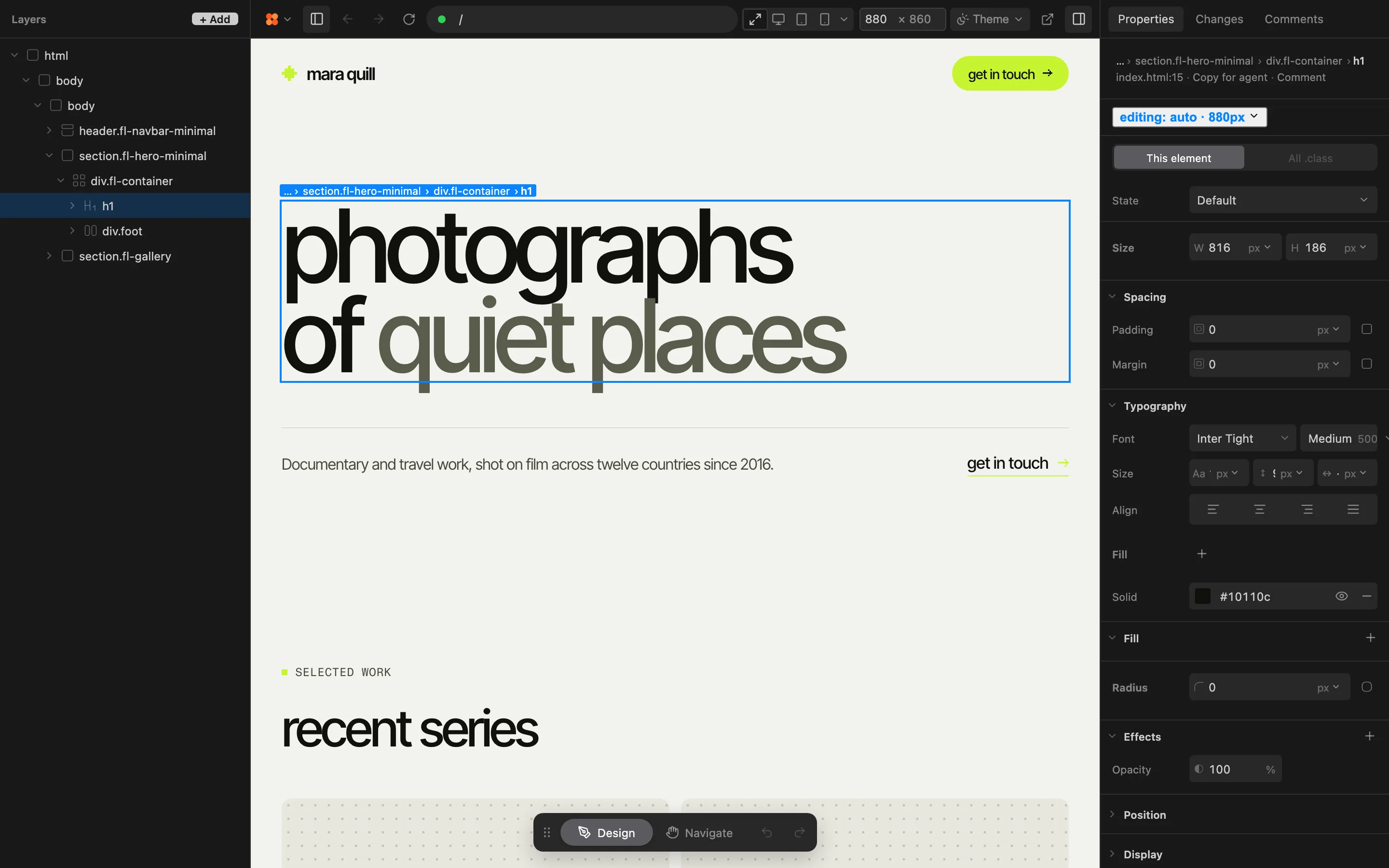
when to choose which
choose an AI builder if
- There is no code yet.
- You want a live URL today.
- You would rather describe than design.
choose Feega if
- The site already exists in a repo.
- Your team reviews code before it ships.
- You want to drag a change, not prompt it.
what it costs
v0 is free for 7 messages a day; Lovable gives 5 credits a day; AI Studio’s first two apps are free; Framer’s Basic is $10 a month. The prices on this page are the ones each company published on the date shown, and they change. Check the source links at the bottom before you decide.
Feega is free and open source under Apache-2.0. It has no AI and no tokens, so a hand edit costs nothing to make.
five builders and your own repo
| v0 | Lovable | AI Studio Build | Framer | Feega | |
|---|---|---|---|---|---|
| Starts from | A chat, or a GitHub repo | A chat, or a ZIP upload | A chat | A canvas | Your repo |
| Your existing repo | Import from GitHub | Creates a new repository | Not stated | No | Yes |
| Where it is hosted | Vercel | Lovable Cloud | Google Cloud Run | Framer | Wherever you host today |
| Changes land as | A branch and a pull request | Commits by a bot | A deploy | A publish | Commits in your repo |
| Price to start | Free, 7 messages a day | 5 credits a day | First two apps free | Free; Basic $10 a month | Free locally |
which one fits
| Your sticking point | Start here |
|---|---|
| No code, need a page by tonight | Framer |
| No code, need an app with a database | AI Studio or Lovable |
| Already on Vercel, like chatting | v0 |
| An existing repo and a team that reviews | Feega |
try editing your own repo in five steps
- InstallAdd the Feega extension in VS Code, Cursor, Windsurf or VSCodium, or run npx feega in the project folder.
- Open the projectFeega starts your dev server and shows the running page next to your layers.
- Click and changePick an element, then set its padding, colour, type or layout in the Properties bar.
- Read the diffEvery edit appears in Changes as a diff against your source. Keep it, or undo it.
- Commit as usualFeega writes files and stops there. Review and commit with the tools you already use.
mistakes people make
Regenerating a site to change a button. You lose the review you had, and the code drifts.
Picking on the demo. Every builder demos a blank start. Test the tenth edit.
questions
Can v0 edit my existing repo?
Yes. It imports from GitHub and opens a pull request when you publish.
Can Lovable open my GitHub repo?
Not directly. Its GitHub sync creates a new repository; to start from yours you upload a ZIP.
Does Google AI Studio import a repo?
Its pages do not say so. It builds new apps and exports to Antigravity.
When is a builder the better choice?
When there is no code yet and you want a live URL today.
Can I move a builder’s output into my repo?
Often, but you then own two histories. Decide before you start.
Does Feega host anything?
No. You keep your own hosting.
how we checked
We make Feega, so read our column with that in mind. We read each product's public pages on 2026-11-18 and compared what they offer, not finished work. Something wrong? Write to hi@feega.app.
- v0 GitHub docs
- v0 pricing
- Lovable GitHub integration
- Lovable plans
- Full-stack apps in Google AI Studio
- Framer pricing
Feega is not affiliated with, endorsed by, sponsored by or connected to any company or product named on this page. All product names, logos and trademarks belong to their respective owners and are used only to identify those products. Information comes from their public pages on the date shown and may have changed since; check the source before you decide. This page is not legal, financial or purchasing advice.
Start from a prompt if you have nothing. Start from your repo if you do.
download for free →