Cursor Design Mode alternatives without an agent
By Andrea Buttarelli, founder of Feega · checked 2026-11-18 · how we checked
Keep Design Mode if you live in Cursor. You annotate the running app and the agent edits the source with the exact component stack. Inside an IDE, little beats it.
Cursor design mode and Feega at a glance
| Cursor Design Mode | Feega | |
|---|---|---|
| How you ask for a change | Annotate the running app; an agent edits | Click an element and set a value |
| Who makes the edit | An AI agent | You; Feega writes it to source |
| Tokens | Agent usage applies | None; no AI |
| Needs | Cursor 3.24.18 or later and a running dev server | An editor, or npx feega; it starts the dev server for you |
| Editors | Cursor | VS Code, Cursor, Windsurf, VSCodium |
| Cost | Free to start; Plus is $8 a month | Free |
| Commits | Its page does not say; you commit in Cursor | You commit as usual |
describing versus setting
With an agent, you say what you want and then check what you got. That is the right trade for a change you cannot easily express as a number, like “make this section feel calmer”.
For a change you can express as a number, setting it directly is faster and has no ambiguity. There is no step where the model decides to also touch the line above.
- Annotate the element
- Write what you want
- Wait for the agent
- Read what it changed
- Click the element
- Type the value
- See it update
- Read the diff
A properties bar, not a prompt box
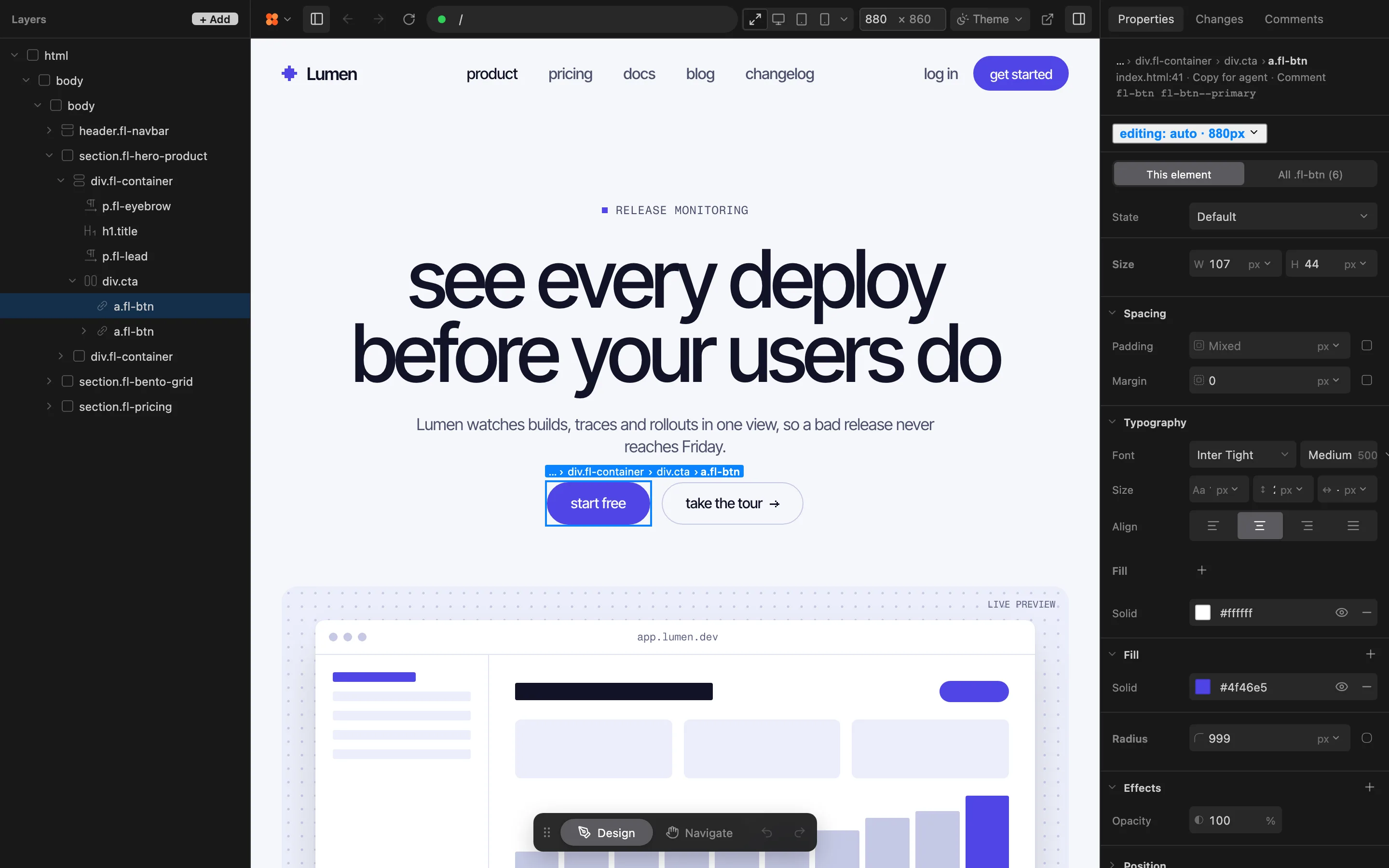
Feega gives you layers, a live preview and a Properties bar, the way a design tool does. Spacing, colour, type and layout are fields you change, with the page updating as you type.
It is built for people who think in controls. If that is you, or if the person making the change is a designer who does not want to write prompts, this is the shape that fits.
the same edit, written the same way
An agent can phrase the same change differently on different runs. Feega has no model, so the same click writes the same line, in your CSS or in your Tailwind classes.
That is useful when a team cares about consistent diffs, or simply when you do not want to spend tokens on a margin.
  <h2
-   className="text-2xl font-medium"
+   className="text-3xl font-semibold"
  >Pricing</h2>
use both
Nothing stops you from running Feega inside Cursor and keeping Design Mode for the bigger asks. They both end in your source files, so the review is the same: read the diff.
A reasonable split is hand edits for values, agent edits for structure.
  .cta {
-   padding: 12px 20px;
+   padding: 14px 24px;
    border-radius: 6px;
  }
when to choose which
choose Cursor if
- You are a developer.
- You run the dev server yourself.
- You commit and review in the same window.
choose Feega if
- You want a Properties bar, not annotations.
- You want the edit made by hand, with no tokens.
- You want the change written the same way every time, with no AI.
what each one costs
Cursor is free to start and Plus is $8 a month, per its pricing page when we checked. Agent edits draw on that usage.
Feega is free and open source under Apache-2.0, and a hand edit uses nothing.
design mode hands the edit to an agent
It needs Cursor 3.24.18 or later and a running dev server. Feega starts the dev server for you, and runs inside Cursor too.
try Feega inside Cursor in five steps
- InstallAdd the Feega extension in VS Code, Cursor, Windsurf or VSCodium, or run npx feega in the project folder.
- Open the projectFeega starts your dev server and shows the running page next to your layers.
- Click and changePick an element, then set its padding, colour, type or layout in the Properties bar.
- Read the diffEvery edit appears in Changes as a diff against your source. Keep it, or undo it.
- Commit as usualFeega writes files and stops there. Review and commit with the tools you already use.
mistakes people make
Describing a two-second drag. Some changes are faster by hand.
Choosing one. You can use both. Feega installs in Cursor and edits the same source.
questions
What does Cursor cost?
Free to start; Plus is $8 a month.
Does Design Mode commit for me?
Its page does not say. Commits happen in Cursor as usual.
Does Feega work inside Cursor?
Yes. Cursor is one of the four editors the extension supports, with VS Code, Windsurf and VSCodium.
Does Feega have an agent?
No. It has no AI. It writes your hand edits to source.
Do I need to start my dev server first?
No. Feega starts it when you open the project. Design Mode needs one already running.
Which frameworks work?
SvelteKit, React, Next.js, Vue, Nuxt, React Router, Astro and Vite, with CSS or Tailwind.
how we checked
We make Feega, so read our column with that in mind. We read each product's public pages on 2026-11-18 and compared what they offer, not finished work. Something wrong? Write to hi@feega.app.
Feega is not affiliated with, endorsed by, sponsored by or connected to any company or product named on this page. All product names, logos and trademarks belong to their respective owners and are used only to identify those products. Information comes from their public pages on the date shown and may have changed since; check the source before you decide. This page is not legal, financial or purchasing advice.
Keep Design Mode for agent edits. Click and set values by hand.
download for free →